Software Engineering for Dummies: A Beginner-Friendly Guide
Software engineering can sound complicated, but its basic idea is simple: plan, build, test, and maintain software in a thoughtful way. It’s more than writing code. It’s a process for creating useful, reliable programs and improving them over time.
What Is Software Engineering?
Software engineering is the practice of designing, developing, testing, releasing, and maintaining software. Software might be a mobile app, a website, a game, or a system that helps a company manage orders.
Programming is one part of software engineering. A programmer writes instructions that a computer can follow. A software engineer also considers questions such as:
- What problem should the software solve?
- Who will use it, and what do they need?
- How should the parts of the system fit together?
- How can the team check that it works correctly?
- How will the software be updated and supported?
The Basic Software Development Process
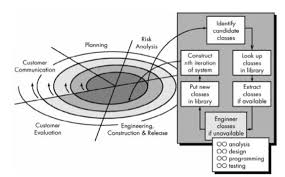
Every team works differently, but many software projects follow a process like this:
- Understand the problem. Identify what users need and what the software should do.
- Plan the solution. Decide which features to build, how they might work, and what tools to use.
- Design the system. Map out the user experience and the software’s main components.
- Write the code. Turn the design into instructions using a programming language.
- Test the software. Look for errors and check that the features behave as expected.
- Release and maintain it. Make the software available, fix issues, and add improvements.
This process isn’t always a straight line. Testing may reveal a problem with the design, or user feedback may lead the team to change a feature. Revisiting earlier steps is a normal part of building software.
Key Ideas to Know
Programming Languages
A programming language lets people give instructions to computers in a structured way. Python, JavaScript, Java, and C# are examples. Different languages are popular for different types of work, but the best choice depends on the project and the team.
Algorithms and Data
An algorithm is a clear set of steps for solving a problem. A recipe is a simple everyday example: it describes actions in a particular order to produce a result. Software uses algorithms to do things like sort a list, find a route, or recommend a song.
Data is the information a program works with, such as names, prices, messages, or images. Software engineers decide how to organize and protect that information.
Front End and Back End
The front end is the part of an application people interact with, such as buttons, menus, and pages. The back end handles behind-the-scenes work, such as processing requests, managing accounts, or saving information. Some engineers focus on one side; others work across both.
Version Control
Version control keeps track of changes to code. It helps people see what changed, restore an earlier version, and work together without overwriting one another’s work. Git is a widely used version control system.
Testing
Testing helps teams find problems before users do. A small test might check one function. A larger test might check whether several parts of an application work together. Testing can’t guarantee that software has no bugs, but it can reduce the chance of problems and make changes safer.
Why Software Engineering Is a Team Effort
Large software projects usually involve people with different skills. Engineers may work with designers, product managers, quality assurance specialists, security experts, and users. Good communication helps everyone understand the goal, share decisions, and catch misunderstandings early.
Teams also use tools to collaborate. These might include code repositories, issue trackers, design software, automated tests, and chat or video meetings. The tools matter, but clear goals and good teamwork matter just as much.
How to Get Started
If you’re new to software engineering, start with a small, practical goal. For example, create a simple web page, write a program that organizes a list, or build a basic calculator. A manageable project gives you a chance to learn without getting overwhelmed.
- Choose one beginner-friendly programming language and learn its basics.
- Practice breaking a problem into smaller steps.
- Read code written by others and try small changes.
- Use version control as your projects grow.
- Test your work and learn how to investigate errors.
- Build projects that interest you, and improve them gradually.
You don’t need to understand every tool or concept before you begin. Learning software engineering is an ongoing process, and it’s normal to look things up, make mistakes, and revise your approach.
The Bottom Line
Software engineering is a practical way to solve problems with software. Coding is important, but successful projects also require planning, design, testing, communication, and maintenance. Start with the basics, build something small, and keep learning as your skills grow.
5 Simple Software Engineering Tips for Beginners
- Break big problems into small steps.
- Use clear names for variables and functions.
- Test your code often, not just at the end.
- Read error messages carefully; they often point to the problem.
- Save your work with version control, such as Git.
Break big problems into small steps.
When a software problem feels overwhelming, break it into smaller steps you can tackle one at a time. For example, instead of trying to build an entire website at once, start by outlining its pages, then create a simple layout, add one feature, and test it before moving on. Smaller tasks are easier to understand, estimate, and troubleshoot, and each completed step helps you make steady progress toward the larger goal.
Use clear names for variables and functions.
Use clear, descriptive names for variables and functions so your code is easier to understand and maintain. A name like totalPrice tells readers more than x, while calculateDiscount() makes a function’s purpose clearer than doStuff(). Good names reduce guesswork, help teammates follow your logic, and make it easier to spot mistakes later.
Test your code often, not just at the end.
Test your code often, not just at the end. Running small tests as you build helps catch mistakes while the code is still easy to understand and fix. Check each new feature, try unusual inputs, and make sure existing features still work after changes. Frequent testing saves time, reduces surprises before release, and gives you more confidence that your software behaves as expected.
Read error messages carefully; they often point to the problem.
When you’re learning software engineering, take time to read error messages carefully instead of treating them as noise. They often identify what went wrong, where the problem occurred, or what the program expected to find. Start with the first error, note any file names or line numbers, and use those clues to inspect your code. Error messages aren’t always perfectly clear, but learning to interpret them can make debugging faster and help you understand how your program works.
Save your work with version control, such as Git.
Save your work with version control, such as Git, so you can track changes to your code over time. If a new update causes a problem, you can review what changed and return to a version that worked. Git also makes it easier to experiment safely and collaborate with others, since teammates can work on separate changes and combine them later. Even for a small project, committing your work regularly can save time and prevent frustration.